

Process Explorer
v17.2 100% Clean & VerifiedProcess Explorer displays detailed information about running Windows processes, their open handles and loaded DLLs, making it easy to see what resources each program uses.
Detailed Overview
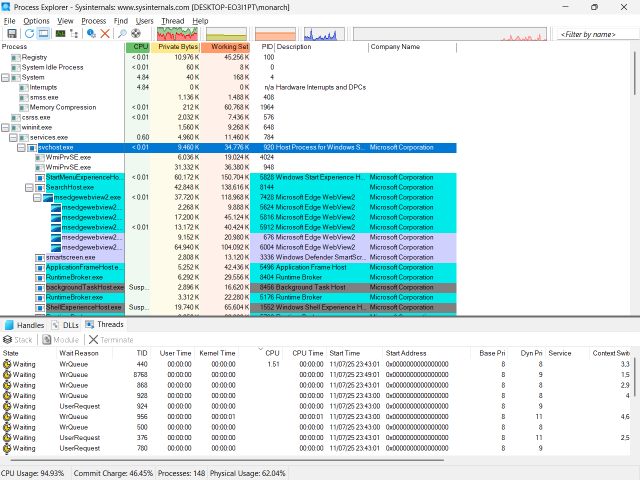
Process Explorer from Microsoft Sysinternals is an advanced system monitoring utility that replaces the standard Windows Task Manager with deep forensic insight into running programs. Its hierarchical dual-pane display lists every active process alongside its open handles, loaded DLLs, and real-time CPU/GPU consumption.
With built-in VirusTotal hash checking, handle searching to resolve locked-file errors, and detailed memory mapping, IT professionals and developers can diagnose software misbehavior and malware instantly. It runs portably without installation on all modern Windows versions.
- Verified official developer direct release channel
- Clean installation footprint with 0 bundled adware, toolbars, or third-party installers
- Verified listing ready for community ratings and feedback
- Standard clean architecture & lightweight system impact
- Native 64-bit architecture optimized for modern multi-core processors
- Requires compatible OS runtime environment (Windows)
- Feature updates and patch frequencies depend on vendor release schedule
Key Capabilities & Features
Key Features
- Process List: Shows all running processes with detailed resource usage.
- Handle Viewer: Displays files, registry keys and other objects each process has open.
- DLL Viewer: Lists loaded DLLs and memory‑mapped files for any selected process.
- Search Function: Quickly locate processes that hold a specific file or DLL.
- Live Mode: Updates in real time without needing to reinstall or reboot.
🖼️ Process Explorer Screenshots & Previews
Interactive slide previews. Click any image to browse full-resolution previews.
Official Download Mirrors
Release v17.2Softzia provides direct routing to verified release channels for Process Explorer with zero third-party intermediaries:
Version History & Release Notes
Chronological record of verified releases, update logs, and older build downloads.
Community Reviews & Ratings
Authentic feedback from verified users and community testers.
Share Your Experience
Help other users by sharing your thoughts on installation, performance, and features.
Verified User Reviews (0)
Be the first to test and review Process Explorer to help our community with verified feedback!
Write the First Review →Report Mirror Issue


Notice a Broken Link or Outdated Release?
Help our link verification team keep Softzia 100% clean and working. Reports are reviewed and verified by our editorial team within 24 hours.
